Yes, you can absolutely get CarPlay in an older car! Most older vehicles that don’t have built-in Apple CarPlay can be upgraded to enjoy its convenient features. This guide will explore your options for bringing the power of CarPlay to your existing car, whether it’s a classic gem or just a few years behind the latest tech.
Getting Apple CarPlay in an older car is more achievable than you might think. While your car might not have come with this feature from the factory, there are several effective ways to achieve CarPlay integration. These methods range from simple adapter solutions to more involved stereo upgrades, all designed to let you connect your iPhone to your car’s display and enjoy a familiar, intuitive interface for navigation, music, calls, and more. We’ll break down each option so you can choose the best path for your vehicle and your budget.
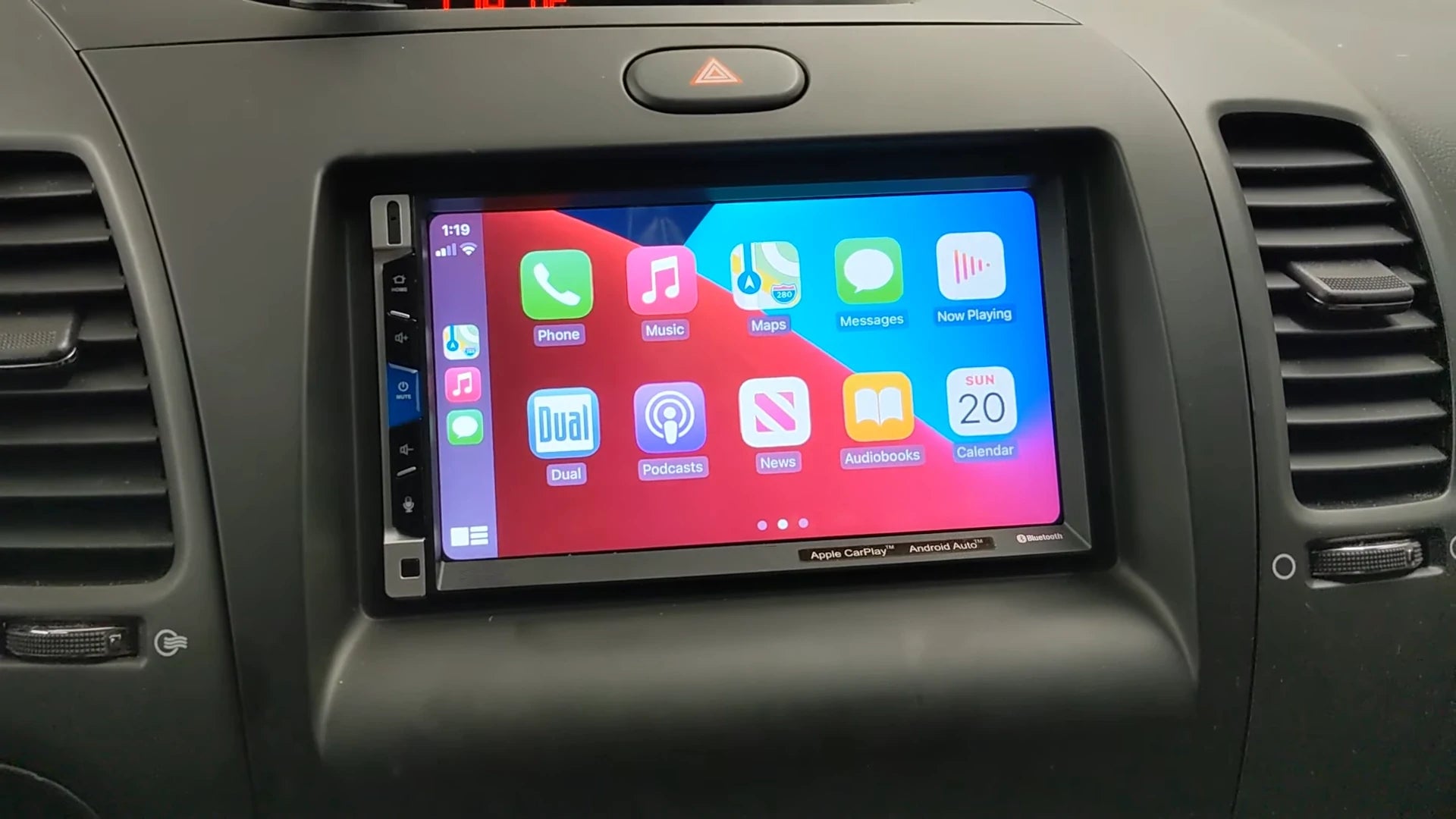
Image Source: cdn.shopify.com
The Allure of CarPlay in Older Vehicles
Modern cars increasingly feature integrated smartphone connectivity, with Apple CarPlay and Android Auto becoming standard. For those driving older vehicles, this can feel like a significant technological gap. CarPlay transforms your car’s infotainment system by mirroring your iPhone’s interface onto the car’s screen. This means you can use familiar apps like Maps, Music, Podcasts, Messages, and even third-party navigation apps like Waze or Google Maps, all controlled through your car’s touchscreen, steering wheel buttons, or voice commands via Siri. This not only enhances convenience and safety by keeping your eyes on the road but also injects a dose of modern technology into a beloved older car.
Option 1: The CarPlay Adapter Solution
One of the most straightforward and affordable ways to get CarPlay in an older car is by using a dedicated CarPlay adapter. These devices are designed to add CarPlay functionality to cars that already have a display screen but lack native CarPlay support.
How a CarPlay Adapter Works
A CarPlay adapter typically plugs into your existing car’s USB port. It acts as a bridge, receiving the CarPlay data from your iPhone and displaying it on your car’s screen. Some adapters connect wirelessly, while others require a USB connection.
- Wireless CarPlay Adapters: These are the most convenient. You pair your iPhone with the adapter via Bluetooth and Wi-Fi, and it establishes a wireless CarPlay connection. This eliminates the need for constant cable plugging and unplugging.
- USB CarPlay Adapters: These require you to connect your iPhone to the adapter with a Lightning cable. While it involves a physical connection, it can sometimes offer a more stable connection and may also charge your phone simultaneously.
Key Considerations for CarPlay Adapters
When choosing a CarPlay adapter, several factors are crucial for a successful integration:
- Compatibility with Your Car’s System: Not all adapters work with all car infotainment systems. You need to ensure the adapter is designed to work with the type of display your car currently has. Some adapters specifically target factory-installed screens, while others are designed for aftermarket head units.
- CarPlay Integration Quality: The quality of the user interface and responsiveness can vary between adapters. Read reviews to gauge how smoothly the adapter performs and if it offers a lag-free experience.
- Connectivity Method: Decide whether you prefer a wired (USB CarPlay) or wireless connection. Wireless offers convenience, but wired can be more reliable.
- Input/Output Ports: Check if the adapter has the necessary ports to connect to your car (e.g., USB-A, USB-C) and if it offers any audio output options if your car’s system doesn’t natively support audio over USB for CarPlay.
Popular CarPlay Adapter Brands and Models
While the market is dynamic, some reputable brands consistently offer reliable CarPlay adapters. Always check the latest reviews and compatibility lists before purchasing.
| Brand | Model Example | Connectivity | Notes |
|---|---|---|---|
| CarlinKit | T2C, T2W, CP2A | Wireless/USB | Very popular, wide range of models |
| Ottocast | U2C, U2AIR | Wireless/USB | Known for ease of use and portability |
| Canshow | Canshow Wireless | Wireless | Focuses on a seamless wireless experience |
| AIYONIC | AIYONIC Wireless | Wireless | Often praised for its compact design |
Installation Process for a CarPlay Adapter
The installation is typically plug-and-play:
- Locate Your Car’s USB Port: Find an available USB port in your car’s dashboard or center console.
- Connect the Adapter: Plug the CarPlay adapter into the USB port.
- Connect Your iPhone:
- Wireless: Follow the adapter’s instructions to pair your iPhone via Bluetooth and Wi-Fi.
- Wired: Connect your iPhone to the adapter using a USB cable.
- Access CarPlay: Your car’s display should automatically switch to the CarPlay interface, or you might need to select the CarPlay source from your car’s media menu.
When to Choose a CarPlay Adapter
- Your car has a factory-installed screen.
- You want a quick, cost-effective solution.
- You prefer minimal installation complexity.
- You are primarily looking to add CarPlay functionality without replacing your entire car stereo.
Option 2: Aftermarket CarPlay Head Units (Car Stereo Upgrade)
For a more integrated and feature-rich experience, replacing your existing car stereo with an aftermarket CarPlay head unit is a popular choice. This involves removing your current radio and installing a new unit that natively supports Apple CarPlay.
What is an Aftermarket CarPlay Unit?
An aftermarket CarPlay head unit is a new car stereo system that you install into your vehicle. These units come with a touchscreen display and built-in support for Apple CarPlay. They often offer additional benefits like enhanced audio quality, modern user interfaces, and compatibility with other smartphone features like Android Auto.
Benefits of an Aftermarket CarPlay Installation
- Seamless Integration: CarPlay is built directly into the head unit, offering a smooth and responsive experience.
- Enhanced Features: These units often come with larger, higher-resolution touchscreens, improved sound systems, Bluetooth connectivity, backup camera inputs, and more.
- Modern Aesthetics: A new head unit can significantly update the look and feel of your car’s interior.
- Customization: Many aftermarket units offer customizable display options and EQ settings to tailor the audio experience.
- Future-Proofing: By upgrading to a modern head unit, you’re better prepared for future app updates and technological advancements.
Types of Aftermarket CarPlay Head Units
Aftermarket head units are generally categorized by their mounting size:
- Single-DIN: These are smaller units, typically with a flip-out or retractable screen. They are suitable for dashboards with limited space.
- Double-DIN: These are larger units with a fixed touchscreen, usually around 6.1 to 7 inches. They offer more screen real estate and often more advanced features.
Choosing the Right Aftermarket Head Unit
When selecting an aftermarket CarPlay head unit, consider these factors:
- Screen Size and Resolution: Larger screens are easier to read and interact with, but ensure it fits your dashboard without modification.
- CarPlay Connectivity: Most units offer wired CarPlay. Look for models that also support wireless CarPlay if that’s a priority.
- User Interface (UI): Some interfaces are more intuitive than others. Browse product images or reviews to see the UI.
- Audio Quality: If audio is important to you, look for units with pre-amp outputs and advanced EQ settings.
- Additional Features: Consider if you need features like satellite radio, HD radio, multiple USB ports, or specific app compatibility.
- Dash Kit and Wiring Harness: You will likely need a dash kit to make the new unit fit your car’s dashboard opening and a wiring harness adapter to connect the new stereo to your car’s existing wiring without cutting wires.
Popular Aftermarket CarPlay Head Unit Brands
- Pioneer: Known for high-quality audio and robust CarPlay integration.
- Kenwood: Offers a wide range of models with excellent features and reliable performance.
- JVC: Provides good value with solid CarPlay functionality.
- Sony: Features user-friendly interfaces and good audio capabilities.
- Alpine: Premium brand with advanced features and excellent sound.
Installation of an Aftermarket Head Unit
This is a more involved process that may require professional installation if you’re not comfortable with car electronics.
- Purchase Necessary Components: You’ll need the head unit, a vehicle-specific dash kit, a wiring harness adapter, and potentially an antenna adapter.
- Remove the Old Stereo: Carefully detach the trim surrounding your old car stereo and unscrew it. Disconnect the wiring harnesses and antenna.
- Prepare the New Head Unit: Connect the new head unit to the wiring harness adapter. If you’re using a backup camera or steering wheel control interface, connect those to the harness as well.
- Install the Dash Kit: Mount the new head unit into the vehicle-specific dash kit.
- Connect and Install: Plug the wiring harness adapter into your car’s factory wiring. Connect the antenna. Carefully slide the new unit into the dash and secure it.
- Test: Turn on your car and test all functions of the new head unit, including CarPlay, radio, Bluetooth, and speakers.
When to Choose an Aftermarket Head Unit
- Your car does not have a display screen, or you want to replace a very basic or non-functional factory radio.
- You desire a more deeply integrated CarPlay experience with a high-quality touchscreen.
- You want to upgrade other aspects of your car’s audio system.
- You are comfortable with a more complex installation process or willing to pay for professional installation.
Option 3: Retrofitting CarPlay Integration
For certain vehicles, especially luxury or performance cars, official retrofitting of CarPlay integration might be an option. This is less common for DIY enthusiasts and usually involves specialized technicians or dealerships.
What is Retrofitting CarPlay?
Retrofitting CarPlay means adding the functionality to a car that was never designed for it by using genuine manufacturer parts or highly specialized third-party modules that are designed to interface with your car’s existing electronics. This is often done for cars where the factory infotainment system is highly integrated and replacing the head unit isn’t feasible or desirable.
How Retrofitting Works
- Manufacturer-Specific Modules: Some car manufacturers offer official upgrade kits or software updates that enable CarPlay on compatible models that didn’t originally have it. This is the most integrated solution but also often the most expensive and limited in availability.
- Specialized Aftermarket Integration Modules: For some premium vehicles, specialized companies create modules that tap into the car’s existing display and control systems to add CarPlay. These are typically designed to work with specific makes and models and require expert installation.
When Retrofitting is the Best Choice
- High-End or Luxury Vehicles: If you own a modern luxury car where replacing the head unit would disrupt integrated vehicle controls, climate functions, or aesthetics, retrofitting might be the cleaner solution.
- Desire for Factory Integration: You want the CarPlay experience to feel as seamless and integrated as possible, using the car’s original screen and controls as intended by the manufacturer.
- Limited Aftermarket Options: For certain makes and models, the aftermarket selection for head units might be poor or non-existent.
Challenges with Retrofitting
- Cost: Retrofitting is often significantly more expensive than adapter solutions or standard aftermarket head units.
- Availability: Official retrofit kits are not widely available, and specialized aftermarket modules are only made for a limited number of vehicle models.
- Complexity: Installation requires deep knowledge of the vehicle’s electronics and is usually best left to professionals.
Option 4: Using a Portable Display Unit
A less common but viable option for very old cars or those with extremely basic audio systems is a portable CarPlay display unit. These are standalone screens that you mount on your dashboard and connect to your iPhone to provide CarPlay functionality.
What is a Portable CarPlay Display?
These are essentially aftermarket screens that have CarPlay built-in. They are designed to be easily installed and removed, making them ideal for cars where you don’t want to make permanent modifications.
How They Work
- Mounting: You typically mount them on your dashboard or windshield using suction cups or adhesive pads.
- Connection: They connect to your iPhone wirelessly or via a USB cable.
- Audio: Audio output can be routed through the portable unit’s built-in speaker, or you can stream it to your car’s audio system via Bluetooth or an auxiliary (AUX) cable.
Key Features to Look For
- Screen Size and Quality: Available in various sizes, from 5 to 10 inches. Consider resolution and brightness.
- Mounting Options: Stability of the mount is crucial.
- Audio Output: Look for Bluetooth or AUX out for better sound.
- Power Source: Usually powered via a USB car charger.
When to Consider a Portable Display
- Your car has no screen or a very basic radio without any upgrade potential.
- You want a CarPlay solution that is easily transferable between vehicles.
- You want to avoid any permanent modifications to your car’s interior.
Downsides of Portable Displays
- Aesthetics: They can look like an add-on and may detract from your car’s interior.
- Mounting Security: Dashboard mounts can sometimes be less secure than integrated solutions.
- Audio Quality: Onboard speakers are usually not as good as your car’s system.
Connecting Your iPhone to Your Car: The Core Process
Regardless of the method you choose, the fundamental goal is to connect your iPhone to your car’s display to enable CarPlay.
Wired vs. Wireless CarPlay
- Wired CarPlay (USB CarPlay): This is the most common and generally the most reliable. You connect your iPhone to the car’s USB port (or to the adapter/head unit via a USB cable). It’s straightforward and often charges your phone simultaneously.
- Wireless CarPlay: This offers ultimate convenience. Your iPhone connects to the car system via Bluetooth for initial pairing and then switches to a Wi-Fi connection for data transfer. This means no cables are needed once set up, but it consumes more battery power from your iPhone and requires a stable wireless connection.
Ensuring a Stable Connection
- High-Quality Cables: For wired CarPlay, use an Apple-certified (MFi) Lightning cable. Cheap, uncertified cables can cause connection issues or data transfer errors.
- Bluetooth Pairing: For both wired and wireless, ensure your iPhone’s Bluetooth is enabled. For wireless CarPlay, the initial Bluetooth pairing is crucial.
- Wi-Fi: For wireless CarPlay, your iPhone must be connected to the car’s Wi-Fi network (which the wireless CarPlay adapter or head unit creates).
- Software Updates: Keep your iPhone’s iOS software updated. Also, check if your aftermarket head unit or CarPlay adapter has firmware updates available, as these can improve performance and compatibility.
Enhancing Your CarPlay Experience
Once you have CarPlay installed, you can further optimize your experience:
Essential CarPlay Apps
- Navigation: Apple Maps, Google Maps, Waze.
- Music & Audio: Apple Music, Spotify, Podcasts, Audible.
- Communication: Messages, Phone, WhatsApp.
- Other: Calendar, Now Playing, and various third-party apps available in the App Store.
Using Siri
Siri is your primary voice assistant for CarPlay. You can activate it by:
- Pressing and holding the voice command button on your steering wheel.
- Pressing and holding the Home button on the CarPlay interface (if available).
- Saying “Hey Siri” if your car’s system supports “Hey Siri” activation (this is less common with aftermarket solutions).
Use Siri to make calls, send messages, get directions, play music, and more, all hands-free.
Steering Wheel Controls
Many aftermarket head units and some CarPlay adapters are designed to work with your car’s existing steering wheel controls, often requiring a separate steering wheel control interface adapter. This allows you to control volume, skip tracks, answer calls, and activate Siri without taking your hands off the wheel.
Frequently Asked Questions (FAQ)
Q1: Can I get CarPlay in my 2005 Honda Civic?
A1: Yes, it’s highly likely. Depending on whether your Civic has a factory screen, you could use a CarPlay adapter (if it has a screen) or a new aftermarket CarPlay head unit.
Q2: Will installing an aftermarket head unit damage my car’s electronics?
A2: If installed correctly by someone experienced, no. Using the correct wiring harnesses and dash kits prevents damage. Incorrect installation could potentially cause issues, so professional installation is recommended if you’re unsure.
Q3: Is wireless CarPlay better than USB CarPlay?
A3: Wireless CarPlay offers convenience by eliminating cables. However, USB CarPlay can be more stable and may provide faster data transfer. Some users also prefer USB for charging their phone simultaneously. It’s a trade-off between convenience and potential reliability.
Q4: How much does it cost to get CarPlay in an older car?
A4: Costs vary:
* CarPlay Adapters: Typically range from $50 to $150.
* Aftermarket Head Units: The head unit itself can cost from $200 to $800+, plus $50-$150 for installation accessories (dash kit, wiring harness) and potentially another $100-$300 for professional installation.
* Retrofitting: This can range from several hundred to over a thousand dollars, depending on the vehicle and the solution.
Q5: Do I need a special iPhone for CarPlay?
A5: No, any iPhone that supports Apple’s current iOS versions (typically iPhone 5 or newer) will work with CarPlay.
Q6: Can I connect my Android phone for Android Auto if I install an aftermarket CarPlay unit?
A6: Many aftermarket CarPlay head units also support Android Auto. Check the product specifications to ensure dual compatibility if you or other drivers use Android phones.
Q7: What if my car doesn’t have an AUX input or Bluetooth for audio output?
A7: If using a CarPlay adapter or aftermarket head unit that outputs audio via USB or another method, you might need a USB-to-AUX adapter or a USB to Bluetooth transmitter if your car lacks modern audio inputs. However, most aftermarket head units offer Bluetooth audio streaming.
Q8: Will I lose my car’s original features if I install an aftermarket head unit?
A8: Typically, no, as long as the correct wiring harness and integration modules (for steering wheel controls, climate display, etc.) are used. Professionals ensure these functions are maintained.
Conclusion
Bringing Apple CarPlay into an older car is a rewarding upgrade that significantly enhances your driving experience. Whether you opt for the simplicity and affordability of a CarPlay adapter, the comprehensive features of an aftermarket head unit, or the specialized approach of retrofitting, you can enjoy the benefits of modern smartphone integration. By carefully considering your car’s existing system, your budget, and your desired features, you can successfully connect your iPhone to your car and navigate, communicate, and entertain yourself with ease and safety. Your older car can now feel as modern and connected as the latest models on the road.